
From a Script to a Tool
Turn a one-off script into dependable tooling with explicit inputs, predictable output, useful errors, focused tests and documentation grounded in real use.
“Can you send me that script?”
A reasonable request. You found the large log files, the result was useful, and now someone wants to run the same check on another server.
Then you remember the path is hard-coded. And the threshold. And there is a second path further down that you really should have removed. You send it with a few instructions, followed by another message starting with “Oh, also…”
The script worked. Sharing it revealed how much of the program was still living in your head. Code is not always enough documentation :)
The First Handover
Let’s use a small example: a script that reports large .log files. It does not delete anything, scan every server or promise to solve storage management before lunch.
For a one-off investigation, a folder name inside the source is convenient. For the next person, “change line 42” is another opportunity to edit the wrong thing.
Give them named inputs instead: the directory and a minimum size. PowerShell has parameter blocks and validation attributes; Python has argparse for arguments, help and input validation. The language changes, but the useful improvement is the same: running the tool no longer requires modifying it.
For example:
python3 large_logs.py ./sample-logs --minimum-bytes 1024
I have included a runnable Python version. Save it as large_logs.py and try it with Python 3.8 or later in a disposable directory. It checks one level, includes hidden files with an exact .log suffix, skips symbolic links and changes no files.
If someone expects a recursive scan, checking only the top level can produce a technically correct answer to the wrong question.
Write down the scope. You do not need twenty options; you need agreement about what the first two mean.
Then Someone Schedules It
Now imagine the script runs overnight. Nobody is watching the terminal, and the next step needs to consume the report.
“Found three large logs” was fine during the investigation. It is less helpful when another script needs their paths and sizes. Give it records it can use:
[{"path": "sample-logs/app.log", "bytes": 2048}]
The Python example writes JSON to standard output and diagnostics to standard error. In PowerShell, return objects that callers can filter or export; apply Format-Table when presenting them to a person, outside the function producing the data.
The same result can now feed a terminal, a report or another automation without scraping a sentence you might reword next week.
And remove interactive questions from the scheduled path. A job waiting at two in the morning for someone to type a folder name is technically running. I would hesitate to call it productive.
The Empty Report
Here is the more interesting problem. The morning report is empty.
Did the scan find no large logs? Or could it not read the directory?
If both outcomes look successful, someone has to investigate before they can trust either of them. An empty report has become another task.
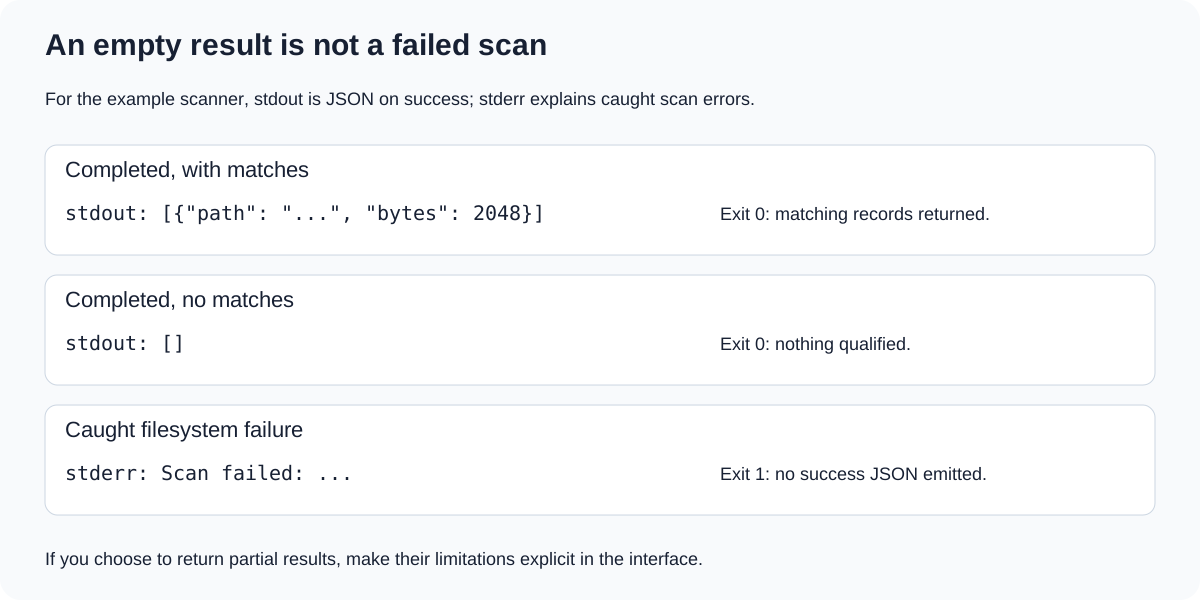
“Nothing found” and “could not look” need different signals.
Our example returns [] for no matches and exits with status 0. A caught filesystem error writes a diagnostic, emits no success JSON and exits with 1. Invalid arguments exit with 2.
A larger inventory might continue after individual failures, but should identify partial results and what could not be checked. Files can change during scanning, and some Python path-query failures can appear as skipped entries. The companion example does not guarantee complete filesystem accounting.
The error itself should give you somewhere to start. “Cannot read directory X: permission denied” is useful. “Something went wrong” mostly confirms what you already suspected.
My New-LogEntry article explores the logging side of this. Logs help explain the failure; they do not replace the failure signal. And keep credentials and tokens out of them. I know how tempting it is to write everything, but… just don’t.
Before Adding Another Feature
At this point, it is tempting to add deletion. We already found the files, after all.
I would first check the promises the reporting tool already makes: a file exactly at the threshold is included, one byte below is excluded, an empty scan succeeds, and a missing directory fails. A few temporary files are enough to catch surprisingly expensive assumptions.
Keep the scanning logic separate from argument parsing so those checks are easy to run. If deletion becomes a real requirement, treat it as a new behaviour with its own tests and preview controls. A --dry-run or -WhatIf option must actually prevent changes; the name alone is not doing any protective work.
Reporting and removing files deserve separate decisions, preferably before anything disappears. And please do not ask me how I know…
The Last Handover Is Usually to Yourself
You come back six months later and discover that the author expected you to remember what final_path2 meant.
That person was you, of course :) Sound familiar?
Leave one working example, requirements, defaults, output format and failure behaviour. Say what it changes and whether rerunning it is safe.
A package can help when distribution calls for it. It cannot explain an undocumented assumption. Surprising behaviour in a module is still surprising behaviour, just with more folders.
The script became a tool through a few ordinary improvements: someone could run it without editing it, another program could use its results, and a failed run could explain itself. You did not need to build a platform. You needed to stop requiring the author to be present.
Future you, opening it before coffee, will appreciate that.
Putting This into Practice: Rebuilding Remove-OldFiles
We have talked about explicit inputs, useful results, failure handling and tests. Let’s put those ideas to work on something that already solved a real problem.
In my original cleanup article, I started with deleting files older than a given number of days. That grew into Remove-OldFiles, which I used at a previous company to manage logs from different automations, each with its own retention policy, and to support other teams with similar cleanup needs. A central CSV held the rules, and local ignore markers provided exceptions.
The rebuild stays in the original repository. In the first part, we make cleanup decisions visible before removing anything. In the second, we replace the CSV with SQL Server rules and keep the scheduled job deliberately simple. There are a few assumptions from my earlier code to revisit along the way :)